0%

Choosing the right Pedestrian Push Buttons is a small decision with major safety consequences. At a signalized crossing, the button must be visible, reachable, durable, and easy to understand. A poorly positioned unit can leave a wheelchair user stretching toward traffic. A silent or confusing button can make a waiting pedestrian uncertain.

The Federal Highway Administration’s Manual on Uniform Traffic Control Devices provides national guidance for pedestrian signal operation, accessibility, signing, and placement. Its recommendations show that button location cannot be separated from crossing geometry. The 2023 National Roadway Safety Strategy also emphasizes safer road design and more reliable pedestrian infrastructure. These reports support a practical point: equipment quality matters, but installation context matters just as much.

The safety need is measurable. According to the National Highway Traffic Safety Administration’s 2022 traffic fatality data, 7,522 pedestrians died in traffic crashes in the United States. That figure does not identify one device as the solution. It does show why every crossing detail deserves careful review. A strong selection process examines activation force, weather resistance, feedback signals, vandal resistance, mounting height, and maintenance access. Audible and tactile confirmation can support people with visual impairments, while large symbols and contrasting surfaces improve recognition.

No product fits every street. A quiet suburban crossing needs different feedback from a noisy urban intersection. That sounds obvious, yet specifications often overlook sound levels, winter gloves, or standing water. This guide compares the practical features, standards, and field conditions that help agencies choose Pedestrian Push Buttons with greater confidence. Always verify local requirements before procurement. Data changes, and real-world observation still matters.
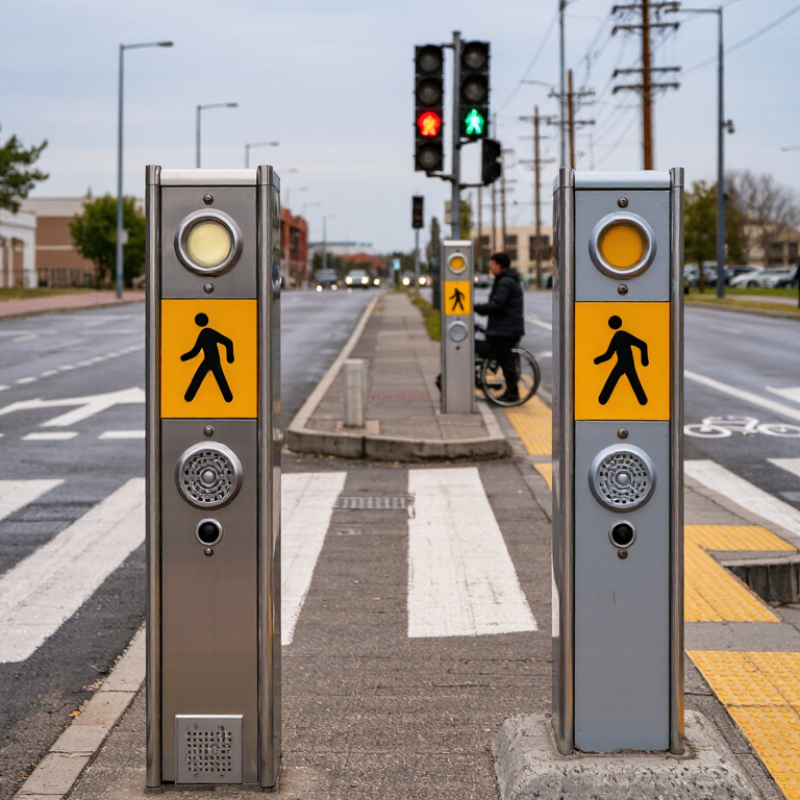
How to Choose the Best Pedestrian Push Buttons?

Understanding Pedestrian Push Button Types and Applications

How to Choose the Best Pedestrian Push Buttons?

Choosing a pedestrian push button starts with the crossing, not the product catalogue. In field inspections, I consider traffic speed, crossing width, weather, and expected foot traffic. A momentary button sends a request when pressed, while a latching design can hold that request until the controller registers it. Many accessible buttons provide raised symbols, tactile feedback, and audible or vibrating confirmation. These details help people wearing gloves, carrying bags, or navigating with limited vision. Keep the action clear. Avoid confusing controls. Test it outdoors.

A quiet residential street may need only a standard weather-resistant button. Busy intersections require strong housings, clear feedback, and durable mounting. School zones benefit from visible locator features and easy reach heights, subject to local standards. Industrial entrances may need sealed enclosures because dust and wash-down water can damage exposed contacts. In cold climates, consider ice buildup and stiff gloves. Coastal areas demand closer attention to corrosion resistance. Wireless buttons can simplify installation, but signal reliability needs testing during peak use. Convenient is not always dependable.

The button must also match the control cabinet and maintenance plan. Check contact ratings, ingress protection, operating temperature, mounting depth, and replacement access. Test the complete user journey, from pressing the button to receiving the walk indication. Record missed requests, delayed feedback, and accidental activations. Small defects become serious complaints. I would not choose by appearance alone. A polished housing can still have poor tactile response or weak seals. Local accessibility rules and traffic engineering guidance should govern final placement. Leave enough space for a wheelchair approach, not merely for a hand.

Evaluating Accessibility, Durability, and Weather Resistance

How to Choose the Best Pedestrian Push Buttons?

A pedestrian push button should be easy to find, press, and understand.

Accessibility begins with placement, contrast, and operating force. The button should work for users standing, seated, or wearing gloves. A raised arrow or tactile symbol can show the crossing direction clearly. Audible and vibrating feedback also helps people with limited vision or hearing. Keep the response distinct. A weak click may confuse users near busy roads.

Durability matters because these devices face repeated impacts, dirt, and constant public use. Choose a housing made for outdoor exposure, with sealed joints and corrosion-resistant hardware.

Look closely. A strong internal switch is useful, but a cracked cover can still cause failure. During evaluation, press the button thousands of times if possible. Check whether the faceplate loosens, the signal response changes, or the button sticks. Real-world testing often reveals problems that product sheets miss.

Weather resistance deserves careful attention. Rain can enter through gaps, while frost may stiffen moving parts. Dust, road salt, and strong sunlight can shorten service life. Select equipment with a clearly stated outdoor protection rating and a tested operating temperature range.

Installation quality matters just as much. Poor drainage or exposed wiring can defeat a well-designed enclosure. I have seen reliable buttons fail because water collected behind the mounting plate.

No test is perfect. Review maintenance records, inspect sample units, and confirm compliance with local accessibility requirements before installation.

Checking Compatibility with Traffic Signal Control Systems

Choosing the best pedestrian push button starts with traffic signal compatibility, not appearance. The unit must communicate correctly with the controller, detector input, and cabinet wiring. A button may feel solid yet fail to register a request. That is a costly surprise.

The U.S. Federal Highway Administration’s Manual on Uniform Traffic Control Devices, 11th Edition, specifies accessible pedestrian features and commonly uses a 3.5-foot-per-second walking speed for clearance calculations. This matters because the button, controller, audible device, and signal timing must work as one system. Check voltage, current, normally open or closed contacts, connector type, and diagnostic feedback before installation. Also confirm whether the controller supports extended timing or accessible pedestrian signals.

Test it on site.

A practical inspection should include wet-weather operation, repeated presses, and nighttime visibility. The FHWA Traffic Signal Timing Manual, Second Edition, recommends documenting controller settings and pedestrian timing during evaluation. That record helps technicians separate a wiring fault from a programming problem. It is easy to blame the button too quickly. In my view, compatibility checklists are useful, but they cannot replace a live test with the actual cabinet. Even a correctly wired device may respond slowly when input filtering, communication modules, or legacy hardware are involved. Review maintenance logs, measure response time, and confirm the pedestrian indication appears after each valid request. Small inconsistencies deserve attention.

Comparing Installation Methods, Features, and Maintenance Needs

Choosing the best pedestrian push button depends on installation conditions, not appearance alone.

In retrofit projects, surface-mounted buttons reduce drilling and keep work areas smaller. They suit poles, temporary cabinets, and locations with limited access. Flush-mounted units look cleaner, but they require accurate cutting and solid enclosure support. Poor alignment can leave a weak seal around the faceplate.

Fit matters.

Before selecting a model, check conduit routes, wall thickness, drainage, and cable reach. A qualified installer should verify operating height, reach range, contrast, tactile markings, and audible or visual confirmation. Local accessibility requirements should guide these decisions.

Weather-exposed sites need sealed housings and corrosion-resistant hardware. In busy crossings, firm feedback helps people know the command registered. However, louder feedback is not always better near homes or hospitals.

Context changes everything.

Maintenance needs should shape the purchase from day one. Choose designs that allow front access, simple cleaning, and quick replacement of switches or contact modules. Inspect fasteners, seals, labels, and response time during scheduled checks.

Dust can collect beneath a button rim and make operation feel stiff. I have seen teams replace the control before checking the mounting plate. That wastes time.

Keep records. No choice is perfect, so review failure patterns after each maintenance visit and adjust the installation plan when evidence shows a weakness.

Selecting the Best Pedestrian Push Button for Your Location

How to Choose the Best Pedestrian Push Buttons?

Selecting the Best Pedestrian Push Button for Your Location

The best pedestrian push button depends on the crossing environment, not just its purchase price. Begin by studying traffic speed, pedestrian volume, and typical user needs. A button beside a quiet school crossing may need different features than one near a busy transit station.

Check the installation surface carefully. The housing should resist rain, dust, temperature changes, and repeated impact. Stainless or corrosion-resistant construction can help in exposed locations. The button should remain easy to press with one hand, even for users wearing gloves. Clear tactile markings, audible confirmation, and visible feedback improve confidence for people with different abilities. Confirm the mounting height and operating force against current local accessibility requirements.

Think about maintenance before selecting the equipment. A sealed button may reduce dirt entering the mechanism, but it still needs inspection. Listen for weak audio signals. Check whether the faceplate becomes slippery after rain. These small details matter.

A mistake is choosing the loudest signal for every location. Near homes, excessive volume may disturb residents, while crowded streets may require stronger guidance. Adjustable sound levels can provide a better balance. Test the button at morning, evening, and poor-weather conditions. A design that works in a showroom may feel completely different beside moving vehicles. When uncertain, request a site trial and record feedback from pedestrians, technicians, and accessibility specialists.

FAQS

Why is traffic signal compatibility important for a pedestrian push button?

The button must communicate with the controller, detector input, and cabinet wiring. A request may fail even when the button feels solid. That is costly.

Which technical details should be checked before installation?

Check voltage, current, contact type, connector style, and diagnostic feedback.

How can technicians test a button properly?

Test repeated presses, wet-weather operation, and nighttime visibility on site.

What records help diagnose pedestrian button problems?

Record controller settings, pedestrian timing, response time, and maintenance history.

Should a surface-mounted or flush-mounted button be selected?

Surface-mounted units need less drilling and suit poles or temporary cabinets.

What installation conditions should be reviewed before choosing a button?

Check conduit routes, wall thickness, drainage, cable reach, and enclosure support.

What features help buttons survive outdoor use?

Weather-exposed locations need sealed housings and corrosion-resistant hardware.

How should maintenance teams reduce unnecessary replacements?

Check the mounting plate, wiring, seals, labels, and response time before replacing controls.

Conclusion

Choosing the right Pedestrian Push Buttons begins with understanding the available types and their intended applications, such as standard wall-mounted units, accessible models, and options designed for high-traffic areas. Key factors include ease of use, clear feedback, visibility, and compliance with accessibility needs. A reliable button should also withstand repeated operation, moisture, dust, temperature changes, and potential impact in its environment.

Compatibility with the existing traffic signal control system is essential to ensure dependable communication and safe operation. Before selecting a model, consider wiring requirements, voltage, mounting surfaces, installation procedures, and long-term maintenance needs. Features such as audible or visual confirmation, tactile indicators, and vandal-resistant construction may improve usability and service life. By comparing these characteristics with the location’s pedestrian volume, weather conditions, accessibility requirements, and available infrastructure, planners can select a practical, durable, and user-friendly solution.

Amelia

Amelia

Amelia is a dedicated marketing professional with a strong understanding of the company’s products, customers, and industry landscape. With a thoughtful, research-driven approach, she transforms complex product information into clear, practical, and engaging content that helps readers make informed......